Architecture Overview
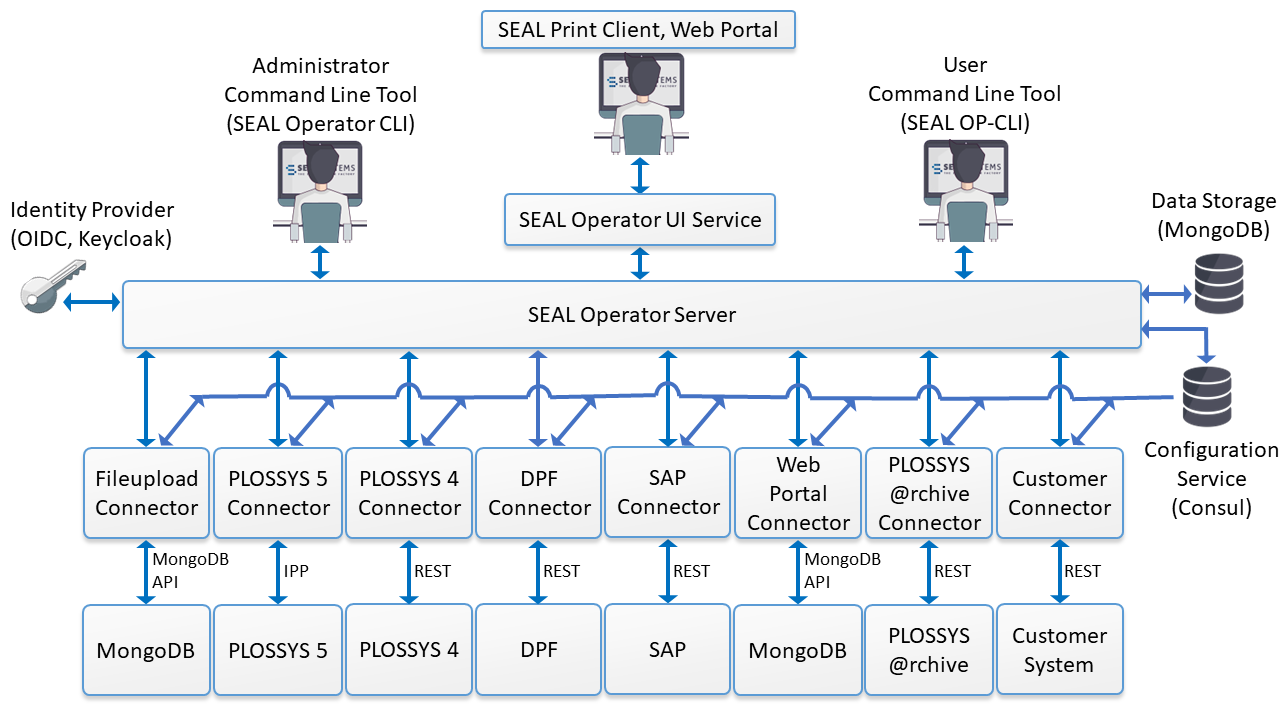
Components of SEAL Operator
SEAL Operator includes the following components:
-
SEAL Operator
Main application as server for the different connectors and different panels such as SEAL Print Client or Web Portal consisting of several microservices such as
seal-operator-server,seal-operator-uiorseal-operator-fileupload -
SEAL Print Client
SEAL Print Client is a Web user interface for creating output jobs. It is available as connector and panel for SEAL Operator. For details, refer to User Interfaces on Windows or Linux.
-
Web Portal
Web Portal is a Web user interface for digital distribution and secure sending of documents. It is available as connector and panel for SEAL Operator. For details, refer to User Interfaces on Windows or Linux.
-
Connector
A connector establishes the connection between the SEAL Operator server and the backend system, for example, PLOSSYS Output Engine or SharePoint.
-
SEAL NATS
As of SEAL Operator 1.5.0, NATS serves as message broker for better message handling. For this, SEAL Systems provides the SEAL NATS package. For more information about SEAL NATS, refer to the SEAL NATS documentation.
-
Identity provider
The identity provider is a service connected with the OAuth 2.0/OpenID Connect (OIDC) protocol. It is responsible for the user authentication and the mapping of rights and roles. SEAL Systems provides a preconfigured Keycloak identity provider for test purposes. In practice, the customer's existing OIDC identity provider handles user authentication and authorization. For more information about Keycloak and other OIDC identity providers used with SEAL Systems products, refer to the SEAL Interfaces for OIDC documentation.
-
Consul
The Consul configuration service provides the system configuration in on-premise installations. Consul discovers services via Domain Name System (DNS) and manages the distributed configuration in a cluster. In a cloud environment, the container orchestration system handles these tasks.
-
MongoDB
The SEAL-specific MongoDB database contains the complete data, for example documents, panels, tasks, and user settings.
Hint - separate installation
As of SEAL Operator 1.3.0, the installation of SEAL Operator no longer includes MongoDB. For how to install and configure MongoDB, refer to the SEAL-specific MongoDB documentation.
-
Credential store
The credential store administrates the user-specific credentials. In the standard installation, MongoDB serves as credential store. For how to change the token used for encrypting the credentials, refer to Change the Token for Encrypting the Credentials on Windows and Change the Token for Encrypting the Credentials on Linux.
-
SEAL Operator CLI
With the command line tool SEAL Operator CLI, you can manage the services of SEAL Operator. You can also export and import the configuration.
-
SEAL OP-CLI
With the command line tool SEAL OP-CLI, you can manage the documents, tasks, panels, and lists of SEAL Operator. For more information, refer to the separate SEAL OP-CLI documentation.
Used Software and Versions
SEAL Operator uses the following software:
- Node.js 22.23.4